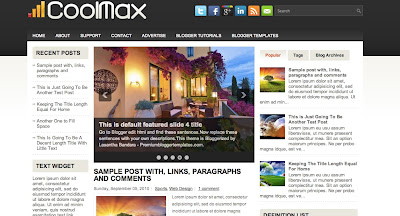
This Is a Three Column Blogger Template with a Left-Right Sidebar.The Template Colors Are mainly White, Black and Grey.The Templates Features Include Web 2.0, Adapted from word press, elegant, fresh, magazine, cool, fixed width, left sidebar, right sidebar, featured section, slider, three column footer, tabbed widget and top navigation bar .
Author Name and URL : Lasantha Bandara
Original Designer URL : http://fthemes.com/coolmax-free-wordpress-theme/
3. How to Use This Template and customizations to be done
Configure Meta tags
Login to your blogger dashboard--> layout- -> Edit HTML.Now Scroll down to where you see below codes :
<meta content='DESCRIPTION HERE' name='description'/>
<meta content='KEYWORDS HERE' name='keywords'/>
Replace DESCRIPTION HERE,KEYWORDS HERE as below.
DESCRIPTION HERE:Write your blog description
KEYWORDS HERE:Write the keywords of your blog separated by comma.
How To Configure Favicon:
Login to your blogger dashboard--> layout- -> Edit HTML.Now Scroll down to where you see below code :
<link href='YOUR-FAVICON-URL' rel='shortcut icon' type='image/vnd.microsoft.icon'/>
Now replace "YOUR-FAVICON-URL" with your Favicon address/url.
Configure Featured Content Slider:
Login to your blogger dashboard--> layout- -> Edit HTML.Find <!-- Featured Content Slider Started -->.Now scroll down slowly and you can see each featured slide codes between <div class='fp-slides-items'> and </div> .
Now replace,
- "This is default featured post X title" with your featured post title.
- "#" with your featured post URL.
- "Go to Blogger edit html and find these sentences.Now replace these sentences with your own descriptions.This theme is Bloggerized by Lasantha Bandara - Premiumbloggertemplates.com." with your slider description.
- Slider image address with your slider image.
How To Change Tab Names of Tab Widget
If you want to change your tab names of your tab widget then find this:
<ul class='tabs-widget tabs-widget-widget-themater_tabs-1432447472-id'>
<li><a href='#widget-themater_tabs-1432447472-id1'>Popular</a></li>
<li><a href='#widget-themater_tabs-1432447472-id2'>Tags</a></li>
<li><a href='#widget-themater_tabs-1432447472-id3'>Blog Archives</a></li>
</ul>
Now change the names "Popular", "Tags" and "Blog Archives" as you like.
How To Add a Header Logo
You can add a header logo for this template easily in the "Page Elements" section(Blogger Default Method).Logo image size must be 342px width and 54px height.
If you have any problem regrading this template,leave a comment below.
Important !!!:
Please do not remove the footer credit. I spend several hours to create this blogger template. So that you can use it for your blog. All I ask is, stay the credit intact.


 Hi! I am P.Harikesh,founder of this blog.You can find many blogging tricks and tips in this blog.