Showing posts with label white. Show all posts

Sunday, March 3, 2013

Twitter Blogger Template

Twitter Blogger Template http://www.blogg-tricks.blogspot.in 
  • Template Name: Twitter Blogger Template
  • Platform: Blogger / Blogspot
  • Release date : 28, February 2013
  • Author : www.templateism.com
  • License : Creative Commons Attribution 3.0
Twitter Blogger Template is inspired from world’s first micro blogging website Twitter.com. Though, this theme is not a replica of Twitter.com but still it has a touch which would convert your Blogger blog into a robust social networking website. The color combination of light blue and place gives it an elegant touch. Since, this theme is inspired from Twitter. Therefore, we have also attached twitter Tweet button. This Theme is extremely efficient and sober which makes it standout from other templates. It has some built-in extra-ordinary features like Numbered page navigation, floating header, and much more.
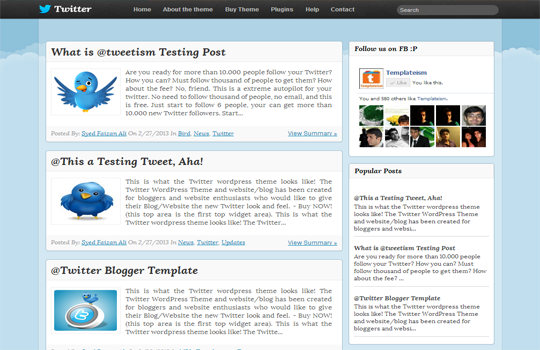
Twitter Blogger Template

Features of Twitter Blogger Template:


  1. Floating Header Bar: It has a sleek and stylish black floating header bar that consists of a Small LOGO, Navigation menu and a search bar. It floats along your screen whenever scroll up or down the page.

  2. Numbered Page Navigation: We have installed Number page navigation plugin in this theme which automatically overrides Older/Newer post buttons. It reduces bounce rate and improves user engagement.

  3. SEO-Friendly: We have also installed an SEO Plugin in this template, which would surely help you to increase your organic traffic in quick succession. Though, the plugin is not FREE, but it is sponsored by MyBloggerLab.com. Therefore, it is free only for this theme.

  4. Custom CSS3 Label: Among the few prominent features, we have also added a magnificent CSS3 Label cloud in this theme which would surely catch some extra attention. 
More Features: Twitter Look, Web 2.0, Magazine Style, light blue and black color Scheme, threaded commenting system, and much more.

How to Customize Floating Menu?

Go To Blogger.com >> Template >> Edit HTML >> Proceed. Now search for the following coding in the template. After finding it Replace # with your URLs and Save the template.
<ul class='art-hmenu'>
<li><a class='active' href='#' title='Home'>Home</a></li>
<li><a href='#' title='About the theme'>About the theme</a></li>
<li><a href='#' title='Buy Theme'>Buy Theme</a></li>
<li><a href='#' title='Plugins'>Plugins</a></li>
<li><a href='#' title='Help'>Help</a></li>
<li><a href='#' title='Contact'>Contact</a></li>
</ul>


Download
Sunday, December 23, 2012

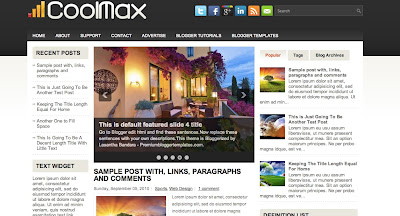
CoolMax


This Is a Three Column Blogger Template with a Left-Right Sidebar.The Template Colors Are mainly White, Black and Grey.The Templates Features Include Web 2.0, Adapted from word press, elegant, fresh, magazine, cool, fixed width, left sidebar, right sidebar, featured section, slider, three column footer, tabbed widget and top navigation bar .

Author Name and URL : Lasantha Bandara
Original Designer URL : http://fthemes.com/coolmax-free-wordpress-theme/

Template Help And Installation :

1. How to Install Blogger Template
2. Customize your template
3. How to Use This Template and customizations to be done 

Configure Meta tags
Login to your blogger dashboard--> layout- -> Edit HTML.Now Scroll down to where you see below codes :

<meta content='DESCRIPTION HERE' name='description'/>
<meta content='KEYWORDS HERE' name='keywords'/>

Replace DESCRIPTION HERE,KEYWORDS HERE as below.
DESCRIPTION HERE:Write your blog description
KEYWORDS HERE:Write the keywords of your blog separated by comma.

How To Configure Favicon:
 
Login to your blogger dashboard--> layout- -> Edit HTML.Now Scroll down to where you see below code :
<link href='YOUR-FAVICON-URL' rel='shortcut icon' type='image/vnd.microsoft.icon'/>

Now replace "YOUR-FAVICON-URL" with your Favicon address/url.

Configure Featured Content Slider:

Login to your blogger dashboard--> layout- -> Edit HTML.Find <!-- Featured Content Slider Started -->.Now scroll down slowly and you can see each featured slide codes between <div class='fp-slides-items'> and </div> .
Now replace,
  • "This is default featured post X title" with your featured post title.
  • "#" with your featured post URL.
  • "Go to Blogger edit html and find these sentences.Now replace these sentences with your own descriptions.This theme is Bloggerized by Lasantha Bandara - Premiumbloggertemplates.com." with your slider description.
  • Slider image address with your slider image.
for each featured slide.

How To Change Tab Names of Tab Widget
If you want to change your tab names of your tab widget then find this:

<ul class='tabs-widget tabs-widget-widget-themater_tabs-1432447472-id'>
<li><a href='#widget-themater_tabs-1432447472-id1'>Popular</a></li>
<li><a href='#widget-themater_tabs-1432447472-id2'>Tags</a></li>
<li><a href='#widget-themater_tabs-1432447472-id3'>Blog Archives</a></li>
</ul>

Now change the names "Popular", "Tags" and "Blog Archives" as you like.

How To Add a Header Logo

You can add a header logo for this template easily in the "Page Elements" section(Blogger Default Method).Logo image size must be 342px width and 54px height.
If you have any problem regrading this template,leave a comment below.
Important !!!:
Please do not remove the footer credit. I spend several hours to create this blogger template. So that you can use it for your blog. All I ask is, stay the credit intact.


Simply Delicious

Simply Delicious Is a One Column Blogger Template with No Sidebar.The Template Colors Are Bright and mainly white.The template has a minimalist design with a one column layout.The first post is large working as a featured post.Other posts are displayed by a thumbnail.You can download This One Column Blogger Template for Free from BestBloggerTemplates.Net.

Template Help And Installation :

1. How to Install Blogger Template
2. Customize your template
3. How to Use This Template and custamizations to be done 


Friday, October 12, 2012

Johny Crottube Template


Johny Crottube Blogger Template is a five column blogger template having left sidebar. Johny Crottube Blogger Template have awesome CSS3 dropdown menu and having awesome mouse hover effect on labels. Johny Crottube Blogger Template have inbuilt search box and having featured posts widget. Johny Crottube is a magazine style blogger template. The main color used in this template are white , black and orange. Johny Crottube Blogger Template have inbuilt related posts widget at the bottom of all the posts. Johny Crottube Blogger Template have 3 column footer. Johny Crottube Blogger Template can be used for video blogger. 

 Features of this template :


1. Awesome Dropdown menu
2. Professional look
3. Five column blogger template
4. Fixed read more on the home page
5. Inbuilt related posts widget 
6. Three column footer
7. Featured posts slideshow  

Template Help And Installation :


View Demo

                                                              
Download